

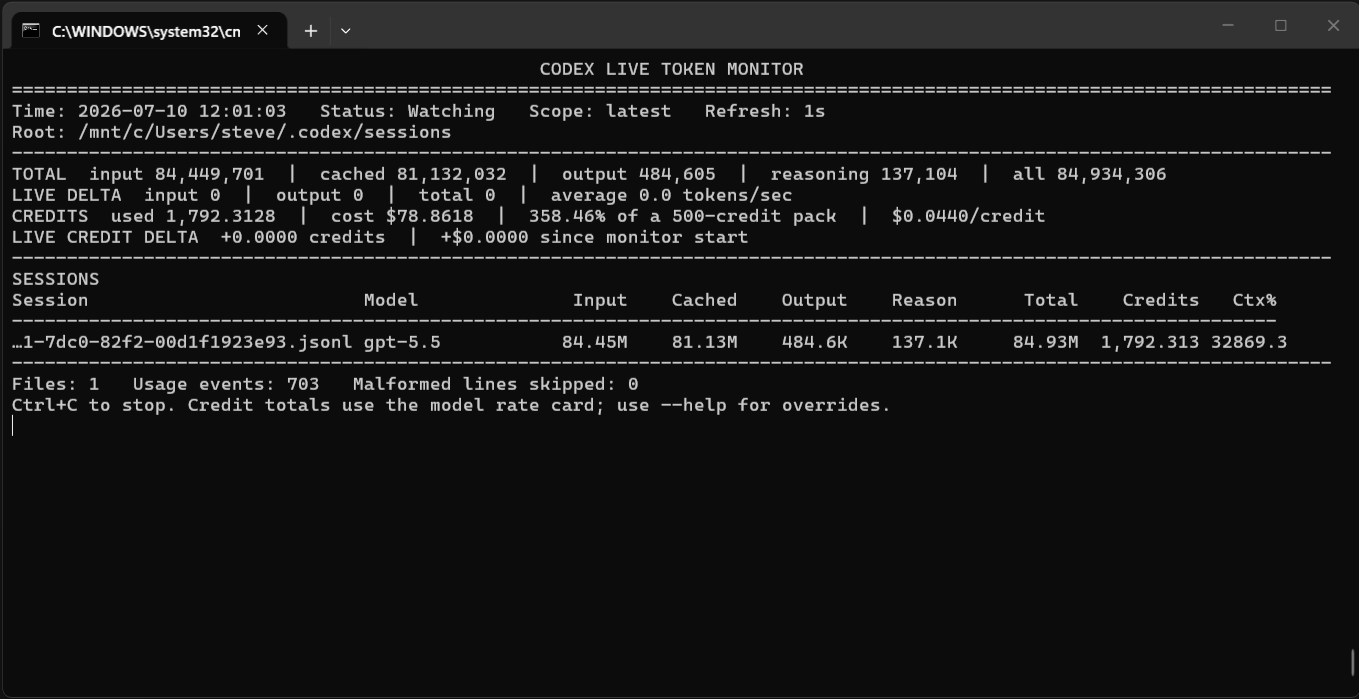
A dependency-free terminal monitor that tails OpenAI Codex session .jsonl files and displays live input, cached-input, output, reasoning, total-token, estimated Codex-credit, and dollar-cost usage.
I made this so I could monitor in real time my Codex costs, after getting a ‘bill’ shock on what I thought was a simple task 🙂
1. Extract this folder somewhere under your Windows user profile.
2. Double-click `run-monitor.cmd`, or run it from Command Prompt or PowerShell.

The launcher passes this default session directory to WSL:

```text
/mnt/c/Users/%USERNAME%/.codex/sessions
```

Arguments can be added after the launcher name:

```bat
run-monitor.cmd --scope today
run-monitor.cmd --scope all --top 25
run-monitor.cmd --refresh 0.5
```

## Credit and cost calculation

The default purchase rate is configured as:

```text
$20 per 500 credits = $0.04 per credit
```

The monitor automatically converts input, cached-input, and output tokens into Codex credits using the model recorded in each session file. It then shows:

- Total estimated credits represented by the selected session scope
- Dollar-cost equivalent at $0.044 per credit
- Percentage of a 500-credit pack represented by that usage
- Credits and cost added since the monitor was started
- Estimated credits for each displayed session

No extra command-line options are needed for the $22/500 calculation:

```bat
run-monitor.cmd
```

Use a different pack price or size when required:

```bat
run-monitor.cmd --credit-pack-cost 40 --credit-pack-size 1000
```

If a JSONL file does not contain a recognised model name, force the model used for all displayed sessions:

```bat
run-monitor.cmd --credit-model gpt-5.4
run-monitor.cmd --credit-model gpt-5.3-codex
run-monitor.cmd --credit-model gpt-5.6-terra
```

You can also supply custom credit rates per one million tokens:

```bat
run-monitor.cmd ^
  --credit-input-rate 62.5 ^
  --credit-cached-input-rate 6.25 ^
  --credit-output-rate 375
```

### Important credit limitation

The session JSONL files record token activity, not your live ChatGPT credit balance or whether a task was covered by included plan usage. The displayed credits and dollar amount are therefore the **credit-equivalent estimate** for the recorded tokens. Purchased credits are generally drawn only after included plan limits are reached.

Fast-mode usage can have a higher credit rate. If the session file does not expose enough information to identify that higher rate, use the custom credit-rate options above.

## Run directly inside WSL Ubuntu

```bash
cd /mnt/c/path/to/codex-live-token-monitor
python3 codex_token_monitor.py
```

The script auto-detects both:

```text
~/.codex/sessions
/mnt/c/Users/*/.codex/sessions
```

Use an explicit path when needed:

```bash
python3 codex_token_monitor.py \
  --root /mnt/c/Users/steve/.codex/sessions
```

## Optional install command

From inside WSL:

```bash
cd /mnt/c/path/to/codex-live-token-monitor
./install-wsl.sh
codex-tokens
```

## Scope options

- `--scope latest` watches the newest session only. This is the default and is best for live use.
- `--scope today` aggregates session files modified today.
- `--scope all` aggregates every JSONL session file below the root. Initial loading can be slower.

## Optional separate API-cost estimate

The credit estimate is enabled automatically. A separate API-price estimate can also be displayed by supplying dollar prices per one million tokens:

```bash
codex-tokens \
  --input-rate 1.25 \
  --cached-input-rate 0.125 \
  --output-rate 10.00
```

Reasoning tokens are shown separately for visibility but are not billed a second time by either calculation; they are normally included within output tokens.

## Useful commands

```bash
# Print one snapshot and exit
codex-tokens --once

# Show today's sessions
codex-tokens --scope today

# Show all known sessions
codex-tokens --scope all --top 25

# Refresh twice per second
codex-tokens --refresh 0.5

# Use a forced model when auto-detection fails
codex-tokens --credit-model gpt-5.4

# Full help
codex-tokens --help
```

Press `Ctrl+C` to stop the live monitor.